Sooo, it has been a while.
There where some things that kept me off track so there you go.
I've got some personal things that affected my eagerness to move forward, also technical things and last and certain not the least work.
I've done a lot of work on the side of my regular job lately.
I did a fun commercial for kidsweek.
https://vimeo.com/120345792
And I am also doing a strawberry plant for an upcoming short film.
I've had some difficulties with that as well but now I am on track for now.
This is the link to the short:
http://aardbeienmysterie.com/
It is a lot of work but now I have some time to get into my own stuff again.
I've been struggling with the face of my character for a bit and must do something about it but I don't know what to do exactly so what I wanted to do for now is focus on the shots that need animation but are not that close to the camera.
I want to move forward so I can get a sense of animating and get shit done so to speak.
I am tired of the stale mate position I find myself in far to many times.
So there you go, a little update.
If I can I will post something asap but that is not for certain since life is kinda hectic right now.
Peace!
Nick
zondag 26 april 2015

zondag 21 december 2014
the room_03
The last couple of days I was really getting into the animation and final tweaking of the room scene.
And since of today I am happy with how it looks.
The still posted here is from the animation so it all looks like this.

I am pretty happy with that.
I exported enough vray matte ID passes with it so I could tweak the coloring of Timmy in nuke.
Also I used a different render technique for the background than for the character, vray has some different methods for those and the bruteforce one for the character worked great without to much hassle, so I was glad for that.
It was a fun task to come up with a nice grade.
This looks cool but it will not mean this is the final grade of the movie.
That will evolve over time fcuz but for now I am happy to get something worth while.
I am really looking forward to spend some time with the project and since it is almost x-mas time I can and therefore will.
I want to finish the in house scenes and play with'm to get a feeling for the animation.
Since this is my first real animation I am eager to dive in and I love to work on the detail which you have to put in the animation it to get it to come across as believable as possible.
So more to follow soon.
Have a great x-mass!
Nick
And since of today I am happy with how it looks.
The still posted here is from the animation so it all looks like this.
I exported enough vray matte ID passes with it so I could tweak the coloring of Timmy in nuke.
Also I used a different render technique for the background than for the character, vray has some different methods for those and the bruteforce one for the character worked great without to much hassle, so I was glad for that.
It was a fun task to come up with a nice grade.
This looks cool but it will not mean this is the final grade of the movie.
That will evolve over time fcuz but for now I am happy to get something worth while.
I am really looking forward to spend some time with the project and since it is almost x-mas time I can and therefore will.
I want to finish the in house scenes and play with'm to get a feeling for the animation.
Since this is my first real animation I am eager to dive in and I love to work on the detail which you have to put in the animation it to get it to come across as believable as possible.
Have a great x-mass!
Nick
dinsdag 16 december 2014
the room_02
I have animated my first scene incl Timmy and I am rendering it right now.
I am rendering the background separate from the foreground.
Just finding a workflow to get those scenes rendered correctly and fast.
This is a still from the first animation scene.
 I am comping this in Nuke, I love the channel workflow but since fusion is free to use I will switch to that compositor.
It will take some time to get that workflow down but it is a cool piece of software for serious comping and I have used it back at filmschool so good to see it becoming available for free or the pro version for a good price.
There is a lot to be done so I will occasionally put some imagery on this blog.
Bye.
I am rendering the background separate from the foreground.
Just finding a workflow to get those scenes rendered correctly and fast.
This is a still from the first animation scene.
It will take some time to get that workflow down but it is a cool piece of software for serious comping and I have used it back at filmschool so good to see it becoming available for free or the pro version for a good price.
There is a lot to be done so I will occasionally put some imagery on this blog.
Bye.
maandag 24 november 2014

zondag 16 november 2014
another render

Can't do that without a composit:D
maandag 13 oktober 2014
character character fix
I had a bit time last weekend so I made some screenshots of what I was doing.
First of all, I love the new interaction tag c4d 16 has come up with.
After seeing the introduction of the tag we where like omg this is a bit to late but awesome.
So I went on with the facial rig but there was something wrong with the main bone, it was twisted so I was thinking should I fix this all or try the interaction tag.
The second it was fcuz and I was looking at the tutorial of Chris Schmidt(http://greyscalegorilla.com/blog/page/3/) and copied some of the expresso in my setup and it was kinda working.
A lot of trial and error with hooking up the posemorphs with expresso but eventually it worked out.
I modelled a bunch of poses and connected them and it works great.
You can assign a posemorph to a selection of the model.
And when you move your cursor it measures the distance traveled and maps that to a resulting percentage of the posemorph.
 I realy love the fact that I could do it, I am by all means not a technical guy and I struggle with everything.
I used the sculpt tools to enhance and position my facial expressions.
Those work great.
I also love the fact that it is not destructive, you don't have to weight nothing, you can keep adding poses and alter as you see fit.
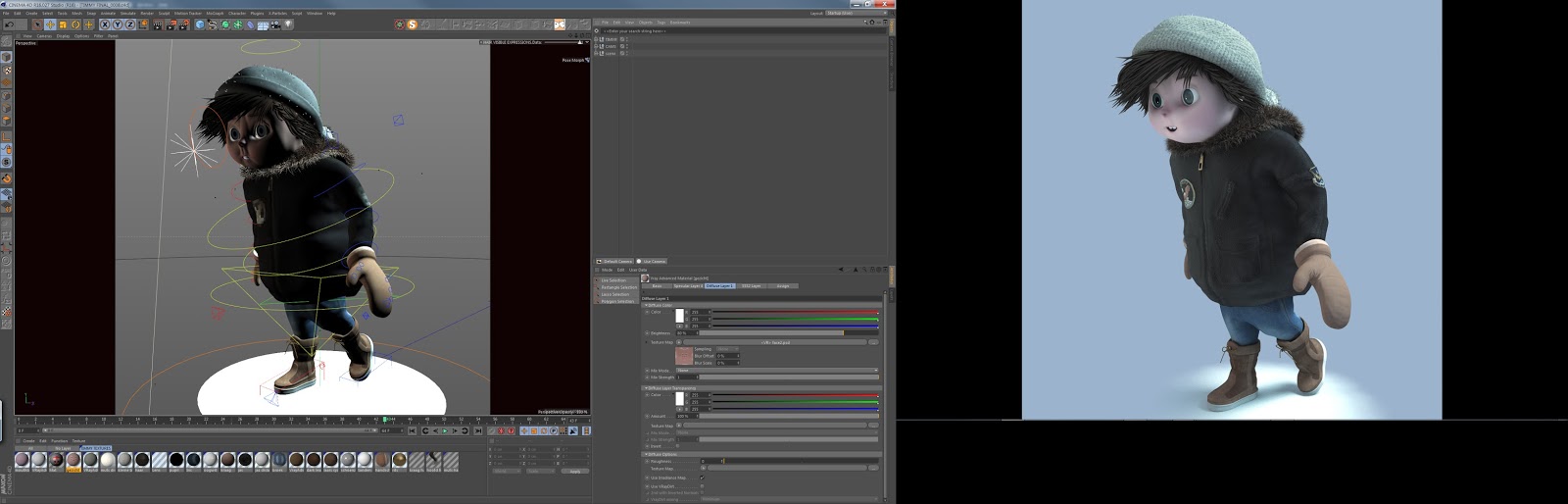 I will make an animation soon but for now some stills I made.
These are more of the model, I redid the painting of the face again.
My new workflow is this, I texture it in photoshop/bodypaint in standard c4d texture/shader mode.
Then I save the texture and it updates the texture that I use in my vray scene.
There are some minor things to be done but I am almost ready to start animating with this character.

 See you soon!
First of all, I love the new interaction tag c4d 16 has come up with.
After seeing the introduction of the tag we where like omg this is a bit to late but awesome.
So I went on with the facial rig but there was something wrong with the main bone, it was twisted so I was thinking should I fix this all or try the interaction tag.
The second it was fcuz and I was looking at the tutorial of Chris Schmidt(http://greyscalegorilla.com/blog/page/3/) and copied some of the expresso in my setup and it was kinda working.
A lot of trial and error with hooking up the posemorphs with expresso but eventually it worked out.
I modelled a bunch of poses and connected them and it works great.
You can assign a posemorph to a selection of the model.
And when you move your cursor it measures the distance traveled and maps that to a resulting percentage of the posemorph.
I used the sculpt tools to enhance and position my facial expressions.
Those work great.
I also love the fact that it is not destructive, you don't have to weight nothing, you can keep adding poses and alter as you see fit.
These are more of the model, I redid the painting of the face again.
My new workflow is this, I texture it in photoshop/bodypaint in standard c4d texture/shader mode.
Then I save the texture and it updates the texture that I use in my vray scene.
There are some minor things to be done but I am almost ready to start animating with this character.
zaterdag 30 augustus 2014
back to the village
Soo finally I had some time to catch up with my project, I was doing some abstract 3d animation in between so that had to be done first gotto pay them c4d yearly upgrades...
I was thinking about what I was going to do and since I was waiting for c4d 16, I was going for texturing the village.
Furthermore I decided that I would start the light situation of the village just before magic hour and later on as the story progresses let the darkness play its roll.
So I have got a render and it is not there yet but it is good enough to show.
.jpg)
So I have used my village setup and started to throw on some textures, nothing fancy, just cubic mapping, it will work not on all places so I will have to fix some things eventually.
I have to fix the windows a bit, and the placement of the trees in the back to.
My lighting setup is fairly simple, an Hdri for global light and a physical sun light for direction of light and shadows.
I use GI, I tried without but I find this one nicer and it renders faster.
Also I put some trees in it and used a multimatte to colour correct it a bit.
Some snow has been added in post, I think that is best done in post or separate, these are long render times so if an animation where to be rendered it would be shitty if one snowflake would ruin it because it would go to fast or whatever.
Also I used optical flares to give it some feel of where the sun was coming from.
This I will eventually do with an external comp tag or light and use the 3D position to feed the flares position.
Render time is between 4 and 5 minutes and I find that a good starting position.
I will fill op the rest of the houses with textures soon and I am happy to see the textures work and give it an unique look to it.
Cheerio
I was thinking about what I was going to do and since I was waiting for c4d 16, I was going for texturing the village.
Furthermore I decided that I would start the light situation of the village just before magic hour and later on as the story progresses let the darkness play its roll.
So I have got a render and it is not there yet but it is good enough to show.
So I have used my village setup and started to throw on some textures, nothing fancy, just cubic mapping, it will work not on all places so I will have to fix some things eventually.
I have to fix the windows a bit, and the placement of the trees in the back to.
My lighting setup is fairly simple, an Hdri for global light and a physical sun light for direction of light and shadows.
I use GI, I tried without but I find this one nicer and it renders faster.
Also I put some trees in it and used a multimatte to colour correct it a bit.
Some snow has been added in post, I think that is best done in post or separate, these are long render times so if an animation where to be rendered it would be shitty if one snowflake would ruin it because it would go to fast or whatever.
Also I used optical flares to give it some feel of where the sun was coming from.
This I will eventually do with an external comp tag or light and use the 3D position to feed the flares position.
Render time is between 4 and 5 minutes and I find that a good starting position.
I will fill op the rest of the houses with textures soon and I am happy to see the textures work and give it an unique look to it.
Cheerio
Abonneren op:
Posts (Atom)